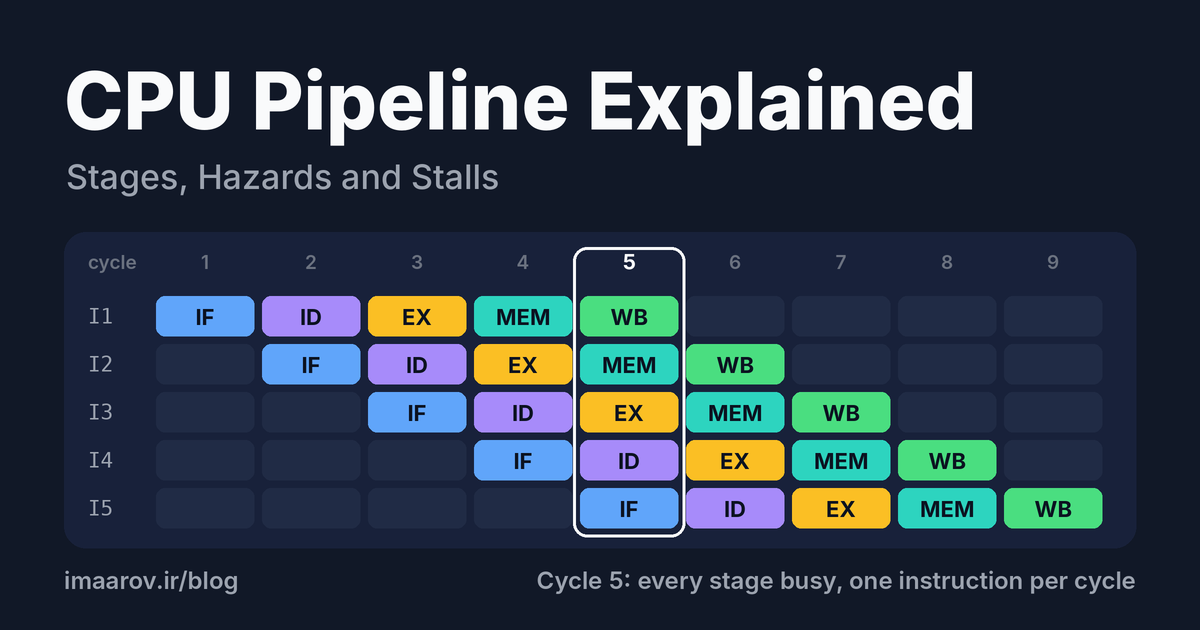
Running one machine instruction takes several steps: fetch it from memory, work out what it means, do the arithmetic, touch memory if it needs to, store the result. A modern core can still complete several instructions in a single clock cycle, and even the simplest textbook CPU aims for one per cycle. Those two facts only fit together if the steps overlap.
That overlap is the pipeline.
In short: a CPU pipeline splits the execution of an instruction into stages (typically fetch, decode, execute, memory access and write-back) and lets a different instruction sit in each stage at the same moment. Any single instruction still takes the same number of cycles, but once the pipeline is full, one instruction finishes every cycle.
That's the idea in one paragraph. The rest of this article covers what textbooks tend to skim: what the clock really has to wait for, how to read a pipeline diagram, why one dependent instruction can stop the flow, and why "just add more stages" runs out of road. Near the end there's a short C program, so you can watch pipelining show up on a stopwatch.
In this article
- Why run instructions in stages at all?
- The five classic pipeline stages
- Watching a pipeline work, cycle by cycle
- Latency vs throughput: what pipelining doesn't improve
- Pipeline hazards: where it goes wrong
- Counting the cost: effective CPI
- Why a deeper pipeline isn't automatically faster
- Try it: see the pipeline on a stopwatch
- Frequently asked questions about CPU pipelines
- Key takeaways
Why run instructions in stages at all?
Imagine a CPU that does everything for one instruction in a single long cycle: fetch, decode, execute, memory, write-back, and only then does the next instruction start. Each piece of hardware works for its slice of that cycle and sits idle for the rest. While the ALU adds two numbers, the instruction memory does nothing. While the register file is being written, the ALU does nothing. If the five stages take about equal time, any given unit is busy roughly one cycle in five.
Pipelining goes after that idle time. Put a register between the stages so each stage's output is held safely, then let the next instruction enter a stage as soon as the previous one has left it. You've probably heard this compared to an assembly line, and the comparison is fair up to a point. What it hides is the thing that makes CPUs hard: cars on a line don't depend on each other. Instructions do.
The five classic pipeline stages
Most textbooks use a five-stage model, and so does the PIPE processor in the Y86-64 chapter of CSAPP. Real chips differ a lot in the details, but the roles carry over.
| Stage | What happens | Hardware involved |
|---|---|---|
| Fetch (IF) | Read the instruction the program counter points at; work out the next PC | Instruction cache, PC |
| Decode (ID) | Figure out what the instruction is; read its source registers | Control logic, register file |
| Execute (EX) | Do the arithmetic, compute a memory address, evaluate a branch condition | ALU |
| Memory (MEM) | Load from or store to data memory | Data cache |
| Write-back (WB) | Write the result into a register | Register file |
Between each pair of stages sits a pipeline register. It captures everything the instruction needs in the next stage: control signals, operand values, partial results. Without these registers, one stage's output would flow straight into the next and change underneath the instruction behind it. With them, each stage works on a stable snapshot for one clock cycle and hands it over at the clock edge. That's what lets five different instructions share the machine without stepping on each other.
Watching a pipeline work, cycle by cycle
Here are five independent instructions moving through the pipeline. Read across a row to follow one instruction. Read down a column to see what the whole pipeline is doing in that cycle.
| Cycle | 1 | 2 | 3 | 4 | 5 | 6 | 7 | 8 | 9 |
|---|---|---|---|---|---|---|---|---|---|
| I1 | IF | ID | EX | MEM | WB | ||||
| I2 | IF | ID | EX | MEM | WB | ||||
| I3 | IF | ID | EX | MEM | WB | ||||
| I4 | IF | ID | EX | MEM | WB | ||||
| I5 | IF | ID | EX | MEM | WB |
In cycle 5 every stage is busy, each with a different instruction. That's a full pipeline.
Two things are worth noticing. First, I1 still needs five cycles from start to finish; it isn't any faster than before. But I2 finishes one cycle later, I3 one after that, and so on, one per cycle. Second, the arithmetic: n instructions through k stages take k + n − 1 cycles, against n × k without pipelining. For 1,000 instructions on five stages that's 1,004 cycles instead of 5,000, a speedup of 4.98×. As n grows, the speedup approaches k, the number of stages.
"Approaches" and "up to" are doing a lot of work in that last sentence. The next few sections are about why.
Latency vs throughput: what pipelining doesn't improve
Pipelining improves throughput, the number of instructions completed per second. It does nothing for latency, the time one instruction takes from start to finish. If anything, it makes latency a little worse.
Here's a worked example with invented but plausible stage delays, in picoseconds:
| Stage | Fetch | Decode | Execute | Memory | Write-back |
|---|---|---|---|---|---|
| Delay (ps) | 200 | 150 | 200 | 250 | 100 |
Without pipelining, one instruction takes the sum, 900 ps. With pipelining, the clock has to be slow enough for the slowest stage (memory, 250 ps) plus the overhead of the pipeline register, which we'll say is 20 ps. That's 270 ps per cycle.
- Throughput: one instruction every 270 ps (about 3.7 billion per second) versus one every 900 ps (about 1.1 billion). A 3.3× gain, not 5×.
- Latency: 5 stages × 270 ps = 1,350 ps per instruction, against 900 ps before. Fifty percent worse.
Two lessons come out of this. Unbalanced stages waste time: the 100 ps write-back stage idles for 170 ps every cycle because the memory stage sets the clock. And the register overhead is a tax you pay on every stage. Keep that second one in mind; it comes back when we talk about depth.
Pipeline hazards: where it goes wrong
The ideal one-per-cycle flow assumes every instruction is independent and the road ahead is always clear. Real programs break both assumptions. Anything that stops the next instruction from proceeding in its next cycle is called a hazard, and it comes in three kinds. The delay shows up as a stall: the pipeline inserts an empty slot, called a bubble, so the dependent instruction can wait.
Structural hazards: two instructions want the same hardware
Suppose instruction fetch and data access share a single memory port. In cycle 4 of the table above, I1 is in MEM wanting to read data while I4 is in IF wanting to read an instruction. One of them has to wait. The usual cure is to give the hardware what it needs: separate instruction and data caches at the first level, so both requests are served in the same cycle. Designers mostly eliminate structural hazards on the drawing board, which is why the other two kinds get all the attention.
Data hazards: an instruction needs a result that isn't ready
add x1, x2, x3
sub x4, x1, x5     ; needs the x1 produced by the add
The add writes x1 during write-back, in cycle 5. The sub wants to read x1 during decode, in cycle 3. With no help from the hardware, the sub has to wait two cycles (a * marks a stage where the instruction is held up):
| Cycle | 1 | 2 | 3 | 4 | 5 | 6 | 7 | 8 |
|---|---|---|---|---|---|---|---|---|
| add x1, x2, x3 | IF | ID | EX | MEM | WB | |||
| sub x4, x1, x5 | IF | ID* | ID* | ID | EX | MEM | WB |
The fix is forwarding (also called bypassing). The add's result exists at the end of its execute stage, cycle 3, long before it's written to the register file. A few extra wires carry it from the pipeline register straight into the ALU input of the next instruction:
| Cycle | 1 | 2 | 3 | 4 | 5 | 6 |
|---|---|---|---|---|---|---|
| add x1, x2, x3 | IF | ID | EX | MEM | WB | |
| sub x4, x1, x5 | IF | ID | EX | MEM | WB |
No stall. The sub's EX in cycle 4 picks up the value the add produced in cycle 3.
Forwarding can't fix everything. A load's data doesn't exist until the end of the memory stage, one cycle later than an ALU result:
lw  x1, 0(x2)
add x4, x1, x5 ; needs the loaded value| Cycle | 1 | 2 | 3 | 4 | 5 | 6 | 7 |
|---|---|---|---|---|---|---|---|
| lw x1, 0(x2) | IF | ID | EX | MEM | WB | ||
| add x4, x1, x5 | IF | ID | ID* | EX | MEM | WB |
One bubble remains, even with forwarding. This is the load-use hazard, and it's why compilers try to slip an unrelated instruction between a load and the first thing that uses it. If you've read CSAPP, the numbers in the PIPE processor will look familiar: one bubble for a load/use hazard, two for a mispredicted branch, three for a ret.
Control hazards: the pipeline doesn't know what to fetch next
A branch decides which instruction comes next, but its outcome isn't known until the execute stage. By then the fetch stage has already moved on. Waiting would burn cycles on every single branch, so CPUs predict: guess the outcome and keep fetching down the guessed path. If the guess is right, nothing is lost. If it's wrong, everything fetched from the wrong path is thrown away (a flush) and fetching restarts at the right address.
Here the branch resolves in EX during cycle 3, and the pipeline had guessed wrong (x marks an instruction discarded at that point):
| Cycle | 1 | 2 | 3 | 4 | 5 | 6 | 7 | 8 |
|---|---|---|---|---|---|---|---|---|
| beq | IF | ID | EX | MEM | WB | |||
| wrong-path 1 | IF | ID | x | |||||
| wrong-path 2 | IF | x | ||||||
| correct target | IF | ID | EX | MEM | WB |
Two cycles lost. Hold on to that number, because the cost of a wrong guess grows with the number of stages between fetch and the point where the branch resolves.
The three pipeline hazards at a glance
| Hazard | Cause | Usual fix | Cost when the fix isn't enough |
|---|---|---|---|
| Structural | Two instructions need the same hardware in one cycle | Duplicate the resource (split instruction and data caches) | A 1-cycle stall |
| Data | An instruction needs a result that's still in flight | Forwarding; scheduling independent work in between | 0 to 1 cycle for load-use, more for long-latency operations |
| Control | The next instruction depends on an unresolved branch | Branch prediction | A flush: 2 cycles in the example above, roughly 12 to 20 on recent x86 cores |
Counting the cost: effective CPI
An ideal pipeline finishes one instruction per cycle, a CPI (cycles per instruction) of 1. Every stall cycle adds to it:
CPI = 1 + average stall cycles per instruction
Take branches. Say 20% of instructions are branches, the predictor is right 95% of the time, and a miss costs 15 cycles:
0.20 × 0.05 × 15 = 0.15 stall cycles per instruction, so CPI = 1.15.
If the predictor is only 90% accurate, the loss doubles and CPI is 1.30. And a 95%-accurate predictor on a pipeline with a 30-cycle penalty also gives 1.30. That's the whole case for spending so much silicon on branch prediction: a few points of accuracy are worth as much as halving the cost of a miss.
It also gives you a more honest speedup estimate. Compared with an unpipelined machine, a k-stage pipeline is roughly k / (1 + stall cycles per instruction) times faster. So a 20-stage pipeline running at a CPI of 1.4 is not 20 times faster. It's about 14 times faster, and that's before counting anything else that goes wrong.
Why a deeper pipeline isn't automatically faster
If one stage's logic takes 200 ps, cut it in two and each half takes about 100 ps, so the clock can run roughly twice as fast. Do that everywhere and you get a superpipelined design: many short stages and a very high clock. On the desktop, Intel's Pentium 4 pushed this furthest. The original had a 20-stage pipeline, and the later Prescott core stretched it to 31, in the hope of reaching clock speeds of 5 GHz. It stalled out around 3.8 GHz, ran noticeably hotter than the core it replaced, and reviewers found its performance underwhelming. Intel's following designs went back to much shorter pipelines.
A toy model shows why the pattern looks the way it does. Assume 1,000 ps of total logic split perfectly evenly, 20 ps of register overhead per stage, 20% branches with a 5% miss rate, and a miss that costs one cycle per stage:
| Stages | Cycle time | CPI | Time per instruction | Gain over previous row | Share of cycle lost to register overhead |
|---|---|---|---|---|---|
| 5 | 220 ps | 1.05 | 231 ps | n/a | 9% |
| 10 | 120 ps | 1.10 | 132 ps | 1.75× | 17% |
| 20 | 70 ps | 1.20 | 84 ps | 1.57× | 29% |
| 40 | 45 ps | 1.40 | 63 ps | 1.33× | 44% |
Each doubling of depth still helps, but less each time, and by 40 stages almost half of every cycle goes to the pipeline registers themselves. The model is generous: it assumes perfectly balanced stages and ignores power, which is where real designs hit the wall. Every pipeline register is a bank of flip-flops switching on every cycle, so more stages means more heat for the same work. Add the fact that perfectly balanced stages don't exist and that load-use delays and cache misses get worse as stages multiply, and you can see why today's mainstream cores sit well short of the Pentium 4's extremes.
What modern chips do instead is attack the penalty itself. Agner Fog measured a branch misprediction penalty of 15 to 20 cycles on Intel's Skylake, and AMD documents 12 to 18 for Zen 2, with 16 as the common case. Those are big numbers, and they're the reason the predictors in current CPUs are some of the most elaborate logic on the die.
What real CPUs add on top
A real core isn't a single five-stage line. It issues several instructions per cycle across multiple execution units (superscalar), it lets instructions that are ready jump ahead of ones that are waiting (out-of-order execution), it keeps a history of past branches to predict future ones, and it surrounds the memory stage with caches so a load doesn't take hundreds of cycles. All of these are answers to the same question: how do we keep the pipeline full? The experiment below shows the principle at its smallest.
Try it: see the pipeline on a stopwatch
This C program adds up the same array of doubles three ways. The only thing that changes is how many independent running totals it keeps.
// pipeline_demo.c
// Same additions, same data. Only the dependency structure changes.
//
// Build:  gcc -O2 -fno-tree-vectorize -o pipeline_demo pipeline_demo.c
// (The flag stops GCC from packing the sums into SIMD instructions, and
//  -ffast-math would let it reorder the additions: both hide what we test.)

#include <stdio.h>
#include <time.h>

#define N      8192        // 64 KB of doubles: stays in cache, so memory is not the bottleneck
#define PASSES 100000

static double a[N];
static volatile double sink;

static double sum_1(void) {            // one chain: every add waits for the previous one
    double s = 0.0;
    for (int i = 0; i < N; i++) s += a[i];
    return s;
}

static double sum_4(void) {            // four independent chains
    double s0 = 0, s1 = 0, s2 = 0, s3 = 0;
    for (int i = 0; i < N; i += 4) {
        s0 += a[i];     s1 += a[i + 1];
        s2 += a[i + 2]; s3 += a[i + 3];
    }
    return (s0 + s1) + (s2 + s3);
}

static double sum_8(void) {            // eight independent chains
    double s0 = 0, s1 = 0, s2 = 0, s3 = 0, s4 = 0, s5 = 0, s6 = 0, s7 = 0;
    for (int i = 0; i < N; i += 8) {
        s0 += a[i];     s1 += a[i + 1]; s2 += a[i + 2]; s3 += a[i + 3];
        s4 += a[i + 4]; s5 += a[i + 5]; s6 += a[i + 6]; s7 += a[i + 7];
    }
    return ((s0 + s1) + (s2 + s3)) + ((s4 + s5) + (s6 + s7));
}

static double now(void) {
    struct timespec t;
    clock_gettime(CLOCK_MONOTONIC, &t);
    return t.tv_sec + t.tv_nsec * 1e-9;
}

static void run(const char *name, double (*f)(void)) {
    double total = 0.0;
    double t0 = now();
    for (int p = 0; p < PASSES; p++) {
        total += f();
        __asm__ volatile("" ::: "memory");   // stop the compiler from reusing the last result
    }
    double dt = now() - t0;
    sink = total;
    printf("%-22s %6.3f ns per element\n", name, dt / ((double)PASSES * N) * 1e9);
}

int main(void) {
    for (int i = 0; i < N; i++) a[i] = 1.0 + i * 1e-6;
    run("1 accumulator", sum_1);
    run("4 accumulators", sum_4);
    run("8 accumulators", sum_8);
    return 0;
}
Build it with the command in the first comment of the code (the extra flag matters, see the caveats below), run it a few times, and compare. On my machine (an Intel Core i7-4510U) the three versions took 1.02, 0.33 and 0.34 nanoseconds per element: roughly three times faster with four chains, and no gain at all from eight. Expect the single-accumulator version to come out several times slower than the four-accumulator one, even though both do exactly the same additions.
Why? A floating-point add takes a few cycles to produce its result (typically 3 to 4 on recent x86 cores), but the adder is itself pipelined and can accept a new add every cycle or so. In sum_1, each add needs the total from the one before it, so it waits for the previous result and the adder is mostly empty. In sum_4, four independent chains keep four adds in flight at once. sum_8 can gain little or nothing over that, because the adder can only start so many adds per cycle. As a rule of thumb, you need as many independent chains as the add latency times the number of adds the core can start per cycle: about three on a core with a 3-cycle add and one adder, eight on one with a 4-cycle add and two. If you know your CPU's clock speed, multiply nanoseconds by GHz to get cycles per element; the single-chain figure should land near the add latency.
That's the whole article in about sixty lines of C: a pipeline is only fast when you give it independent work to overlap. CSAPP's chapter on optimizing program performance builds this up in much more detail under the name "multiple accumulators."
A few honest caveats. Run it several times and close other programs, since timing noise is real. Results depend on the CPU, because cores with a very low floating-point add latency will show a smaller gap. And if you compile with -ffast-math, the compiler is allowed to reorder the additions itself and the difference may vanish, which is a nice demonstration of the same point from the other side. The same goes for vectorization: without -fno-tree-vectorize, recent GCC versions can pack the independent sums into SIMD instructions that add two or four doubles at a time, so you would be measuring SIMD on top of pipelining.
Frequently asked questions about CPU pipelines
Is pipelining the same thing as parallelism?
It's one kind of parallelism, working inside a single core: different instructions occupy different stages at the same time. Multi-core parallelism is separate. Each core has its own pipeline, and a program has to be split into threads to use more than one.
Does pipelining make a single instruction run faster?
No. One instruction still passes through every stage, and with the overhead of pipeline registers it can take slightly longer than it would on an unpipelined design. What improves is how many instructions finish per second.
How many stages does a modern CPU have?
There isn't a clean single number, because vendors rarely publish one and it depends on how you count the front end and the back end. A more useful figure is the branch misprediction penalty, which is roughly 12 to 20 cycles on recent x86 cores and tells you how long the part of the pipeline between fetch and branch resolution really is.
What is a pipeline bubble?
An empty slot that moves down the pipeline when a stage has nothing useful to do, usually because an instruction is waiting for a result or because wrong-path instructions were flushed. Bubbles are what stalls look like in a timing diagram.
What happens to the pipeline when a branch is mispredicted?
The instructions fetched down the wrong path are discarded, the fetch stage is redirected to the correct address, and the pipeline refills from the front. The time between fetching the branch and learning its outcome is the penalty.
Key takeaways
- Pipelining overlaps instructions across stages. Throughput goes up; the latency of a single instruction does not improve.
- With k stages and n instructions you need k + n − 1 cycles, so the ideal speedup approaches k.
- Structural, data and control hazards cause stalls. Forwarding hides most data hazards, and branch prediction hides most control hazards, but neither hides all of them.
- Deeper pipelines allow faster clocks and make every misprediction more expensive. The returns shrink quickly, and power is usually what ends the climb.
What to read next
This is the first article in a series on CPU pipelines. The following ones go deeper into hazards and forwarding, stalls and bubbles, and branch prediction, which is where most of the interesting engineering lives.
Sources and further reading
- Randal Bryant and David O'Hallaron, Computer Systems: A Programmer's Perspective, chapter 4 (processor architecture and the PIPE design) and chapter 5 (optimizing program performance).
- David Patterson and John Hennessy, Computer Organization and Design, the chapter on the processor and pipelining.
- Agner Fog, The microarchitecture of Intel, AMD and VIA CPUs.
- Chips and Cheese, Analyzing Zen 2's Cinebench R15 lead, for the Skylake and Zen 2 misprediction penalties quoted above.
- ComputerBase, Im Test vor 15 Jahren: Intels Prescott war ein Rückschritt durch Fortschritt (German), for Prescott's heat and performance.